Adversary-in-the-Middle (AiTM)
When MFA is no longer enough
You thought you were safe with a password and MFA. But what if an attacker hijacks your entire login session? AiTM attacks bypass MFA completely and have become the dominant technique behind Business Email Compromise.

44%
of AiTM attacks occur outside the office network
88%
of cyber attacks start with a fake login page
2 min
to protect your browser with Attic FREE
What is an Adversary-in-the-Middle attack?
An Adversary-in-the-Middle (AiTM) attack is an advanced form of phishing where the attacker sets up a fake login page that acts as a proxy between the victim and the real website. Unlike traditional phishing that only steals a password, AiTM intercepts the entire authentication flow, including MFA codes and the session cookie issued by the identity provider afterwards.
The result: the attacker obtains a valid session token that grants full access without any further authentication. For Microsoft 365, this is particularly dangerous because a single session cookie unlocks email, SharePoint, OneDrive, and Teams.
AiTM attacks have grown exponentially over the past two years. According to the Attic AiTM Threat Report, this technique has become the default for targeted attacks on organisations using Microsoft 365. Toolkits like Evilginx, Modlishka, and Caffeine have made launching AiTM attacks accessible to criminals with no technical expertise, lowering the barrier from specialised hacking to point-and-click phishing-as-a-service.
How an AiTM attack works step by step
The attacker deploys a reverse proxy that relays traffic between you and Microsoft. It looks exactly like the real login page. Because it is the real page, just with every request passing through the attacker's server.
- 1
Phishing email with link
You receive a convincing message containing a link to a cloned Microsoft login page hosted on the attacker's proxy
- 2
Credentials entered
You enter your email and password. The proxy forwards them to the real Microsoft login in real time
- 3
MFA completed
Microsoft prompts for MFA. You approve the push notification or enter the code. This is also relayed through the proxy
- 4
Session cookie stolen
Microsoft issues a session cookie. The attacker captures it and now has full access, without needing your password or MFA again
AiTM vs Man-in-the-Middle (MitM): what's the difference?
The terms are often used interchangeably, but there is a critical difference. A classic Man-in-the-Middle attack intercepts network traffic, for example on an open Wi-Fi network, to eavesdrop on or manipulate data in transit between two parties.
An Adversary-in-the-Middle attack is more targeted. The attacker actively sets up a fake website that functions as a reverse proxy. The victim communicates with the real service (such as Microsoft 365), but all traffic flows through the attacker's server. The crucial difference: AiTM is specifically designed to bypass MFA by stealing the session cookie after successful authentication.
Man-in-the-Middle
- • Passive eavesdropping on network traffic
- • Requires network access (e.g. Wi-Fi)
- • Blocked by HTTPS/TLS
- • Targets data in transit
Adversary-in-the-Middle
- • Active reverse proxy on fake website
- • Works via phishing link (anywhere)
- • Not blocked by HTTPS
- • Targets session cookies after MFA
Why MFA is no longer enough
Most organisations rely on MFA as their primary line of defence. In an AiTM attack, that line is meaningless. The attacker simply waits until you approve MFA and then steals the session.
-
SMS codes, authenticator apps, and push notifications are all vulnerable
Every one of these methods is intercepted by the reverse proxy. The attacker simply relays them to Microsoft
-
Full access to Microsoft 365
Read and send emails (payment fraud), search SharePoint and OneDrive (data theft), and spread the attack to contacts
-
No alarms in Microsoft
The attacker logs in with a valid session cookie. To Microsoft, they are “you”. No suspicious activity, no password reset triggered
-
It happens everywhere
44% of AiTM attacks occur outside the office network, at home, while travelling, or on a client's network
How to protect your organisation against AiTM
Effective protection against AiTM requires measures at multiple levels. The key: stop the attack before the user enters their credentials.
Browser-based protection
Install a browser extension that identifies fake login pages the moment you visit them. Attic FREE does this at no cost, blocking AiTM proxies before you can enter credentials.
Phishing-resistant MFA
Switch to FIDO2 security keys or passkeys. These methods are bound to the domain of the real website and will not work on a proxy.
Conditional Access
Configure Microsoft 365 Conditional Access policies to restrict sessions to compliant devices and trusted locations. This reduces the attack surface significantly.
Continuous monitoring
Detect suspicious login patterns and session anomalies in real time. Attic MDR monitors your Microsoft 365 environment 24/7 and responds automatically to suspicious behaviour.
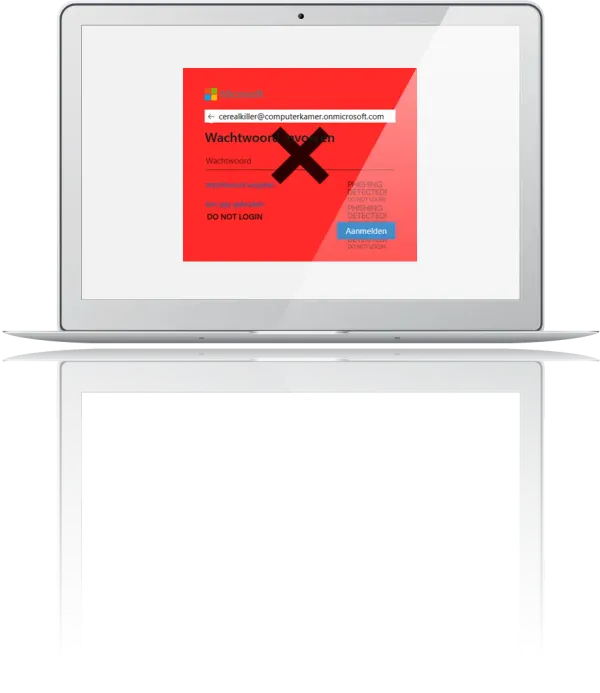
Protection where the hack happens: in your browser
Attic protects at the exact moment and location where AiTM attacks take place. Where other solutions only detect after the damage is done, Attic intervenes before you enter credentials on a fake page.
-
Authenticity Seal
Attic recognises the real Microsoft login page and displays a green seal. No seal? You know you're on a fake page
-
Real-time Blocking
When AiTM characteristics (reverse-proxy signatures) are detected, the connection is blocked with a red warning screen
-
No privacy concerns
Attic only secures login moments and does not monitor private browsing
-
Available for free
Basic protection against the most common threat should be accessible to everyone
Download the AiTM Threat Report
The Attic LAB research team has analysed the latest AiTM techniques. The report covers attack frequency, toolkits in use, targeted industries, and concrete recommendations for protection.
Frequently asked questions about AiTM
Protect your login process in less than 2 minutes
Install the Attic browser extension and prevent AiTM attacks from bypassing your MFA. Free, no strings attached.